






 Русский
 ქართული
 Српски
 Ελληνικά
Help
How to sign in to Nozhove
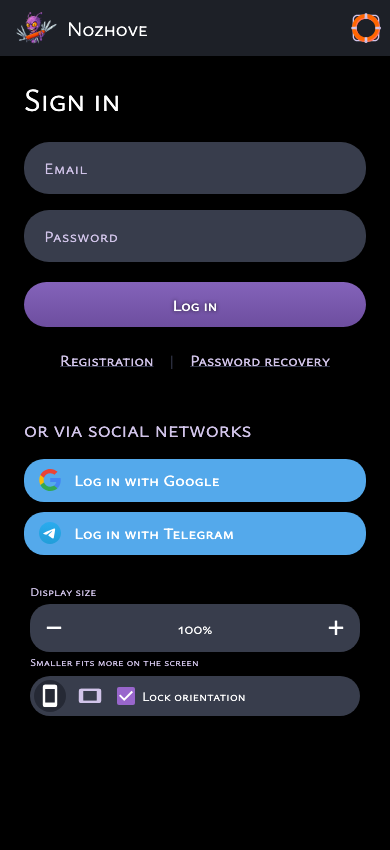
Sign in with email and password or with Google / Telegram. The same account works on the website and in the app.
Steps
Enter your email and password → press Log in. Or choose Google / Telegram and confirm. The app keeps you signed in automatically; there is no Remember me checkbox.
-
Email
Enter the email address you registered with Nozhove.
-
Password
Enter your Nozhove password. Characters are hidden. Do not enter your Google or Telegram password here.
-
Log in
Submits your email and password. If sign-in fails, check the address, password and keyboard language.
-
Registration
If you have no account, open registration and create one with your email. Then return to sign in.
-
Password recovery
Forgot your password? Open recovery and enter your account email. In the app this link opens in the system browser.
-
Log in with Google
An alternative to entering a Nozhove password. Choose a service and confirm sign-in. Your first sign-in creates an account automatically. The website Telegram button uses an external widget and may be unavailable if the service is blocked.
-
Log in with Telegram
An alternative to entering a Nozhove password. Choose a service and confirm sign-in. Your first sign-in creates an account automatically. The website Telegram button uses an external widget and may be unavailable if the service is blocked.
-
Display scale
Makes app elements and text smaller or larger.
-
Screen orientation
Chooses the app screen orientation. These settings do not affect sign-in.